Build, simulate, and analyze block diagram systems without installing a single byte.
WASM-powered, AI-controllable via MCP & Scripting API, and zero license friction.
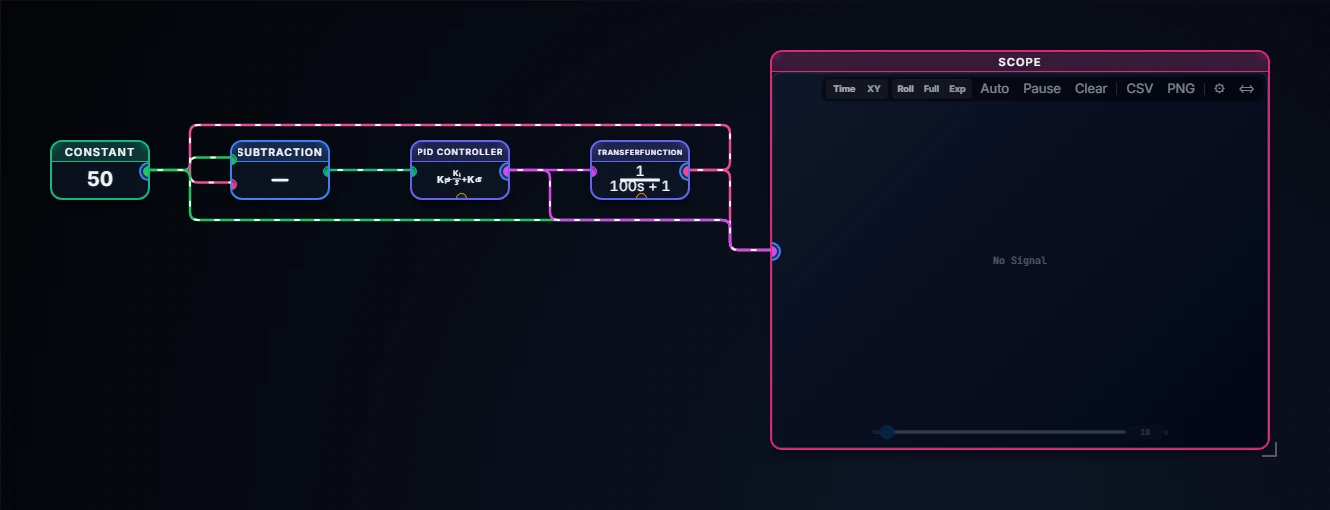
A PID temperature control loop, built and simulated entirely in the browser.
Why engineers choose BlockWerk
Simulink is powerful — but friction-heavy. BlockWerk brings the same modelling paradigm to your browser, open to external AI agents via MCP.
Zero Setup
Open blockwerk.tech and start building. No installation, no account required, no license keys to manage.
AI-Controllable (MCP)
Connect your external AI assistant (Claude, ChatGPT) via open Model Context Protocol (MCP) to programmatically build, inspect, and optimize diagrams.
High Performance
A native Rust simulation engine compiled to WebAssembly. Near-native speed with precise numerical solvers.
Real-Time Multiplayer
Collaborate concurrently on the same block diagram with colleagues or students via PartyKit and WebSockets. Live shared cursors and instant sync.
Code Generation
Export your model as standalone C++ source, with an Arduino sketch template to start from, or as Python and Rust, without paying for Simulink Coder. Review and test the result on your own hardware before you deploy it.
Phone-as-Sensor (HIL)
Scan a QR-code to connect your smartphone via WebRTC. Use real IMU accelerometer or touch joystick data to drive physical and 3D simulations live.
BlockWerk vs Simulink
A practical comparison for engineers evaluating simulation tools for control systems, robotics, and signal processing.
Feature
BlockWerk
Simulink Desktop
MATLAB Online
PathSim (Pyodide)
Xcos (Scilab)
Cost
✓ Free in Browser
✕ $$$$ / year
△ Limited Free / Sub
✓ Free (Open Source)
✓ Free
Execution Mode
✓ Client WASM (Zero Latency)
✓ Desktop Native
✕ Cloud Streaming (US Latency)
△ Pyodide (Python WASM)
✕ Desktop App
Installation
✓ None (In-Browser)
✕ Heavy Install (6GB+)
✓ None (Browser)
✓ None (Browser)
✕ Desktop App
AI Control (MCP & API)
✓ Open MCP Protocol & API
✕ None
✕ None
✕ None
✕ None
Local Project Storage
✓ In your browser (IndexedDB)
✓ Local Files
✕ Cloud Processed
✓ Local Files
✓ Local Files
Programmatic API
✓ Agent API (JS)
✓ MATLAB Scripting
✓ MATLAB Scripting
△ Limited Python
△ Limited Scilab
Precision Solvers
✓ RK4, RK45 (Dormand-Prince), TR-BDF2 (Stiff)
✓ Variable-Step / Stiff
✓ Variable-Step / Stiff
✓ 18+ Solvers (SciPy)
△ Limited
Real-Time Collaboration
✓ Live Multiplayer (PartyKit) + URLs
✕ Desktop Files
△ MATLAB Drive (File Sync)
✕ Export Files
✕ Offline Files
Code Generation
✓ C++, Python & Rust Export (Free)
△ $$ (Simulink Coder add-on)
△ Limited / Extra License
✕ None
△ Limited / Complex
Phone-as-Sensor / HIL
✓ WebRTC QR Sensor + MQTT (Zero Setup)
△ Complex Hardware Support Packages
✕ None
✕ None
✕ None
🏛️ When Simulink is the Right Choice
Simulink remains the industry standard for formal aerospace/avionics certification (DO-178C), multi-million variable dynamic systems, and enterprise engineering departments invested in decades of proprietary MATLAB codebases.
⚡ When BlockWerk Outperforms
Choose BlockWerk for interactive education and physical intuition, rapid proof-of-concept modeling, zero-install classroom workshops, real-time multiplayer design sessions, and autonomous simulation control by AI agents via the open Model Context Protocol (MCP).
Numerical Accuracy & Analytical Validation
Trust is earned through numerical proof. BlockWerk's Rust/WASM solvers are rigorously verified against exact analytical closed-form solutions.
2nd-Order Harmonic Step Response
Standard test plant $G(s) = \frac{\omega_n^2}{s^2 + 2\zeta\omega_n s + \omega_n^2}$ ($\omega_n=10\text{ rad/s}, \zeta=0.2$) evaluated against the exact analytical solution:
For stiff differential-algebraic equations (e.g. fast thermal/hydraulic transients with time-scale separation $\Delta t_1 \ll \Delta t_2$):
L-stable composite Trapezoidal + Backward Differentiation Formula (TR-BDF2)
✓ Unconditional stability where standard explicit RK4 diverges
Who is it for?
From hardware startups to signal processing students.
Education
Modern controls courses don't need a lab full of MATLAB licenses. Students can run complex sims on any device, anywhere.
Rapid Prototyping
Prototyping a dynamic system is fast. Build visually with drag-and-drop or drive canvas generation programmatically via scripts and external AI tools.
AI Agents
Give your LLM a numerical "sandbox" to test ideas. Connect via open Model Context Protocol (MCP) or the Agent API to programmatically build, run, and optimize system designs.
Client Communication (Beyond Excel)
Replace static spreadsheets and confusing tables with an interactive demonstrator your client actually understands. Technical sales, consultants, and OEMs can send a 1-click link to let clients adjust live sliders (power, flow, temperature) and see real-time physical responses.
Frequently Asked Questions
Do I need MATLAB to use BlockWerk?
Absolutely not. BlockWerk is a completely independent ecosystem. The simulation engine and UI run natively in the browser using Rust/WASM.
Can I replace our company's Excel models with BlockWerk?
Yes, especially for dynamic systems. Excel is great for tabular data, but struggles with systems involving time steps, physical inertia, and feedback loops. BlockWerk turns static spreadsheet logic into an interactive web app you can share with clients via a simple link, allowing stakeholders to experiment with live sliders without broken formulas or version confusion.
Is my data secure?
Simulations run in your browser, and projects are stored on your own device (IndexedDB). A diagram only leaves your machine when you use a feature that needs a server: a share link carries the compressed diagram in its URL, and a live collaboration session, the built-in AI assistant or an AI agent connected via MCP send the model data they work with. Read our full Privacy Policy.
Can I import existing Simulink files?
Not yet — native .slx import is on the roadmap. For now, you can rebuild models using the visual editor, or connect an AI agent via MCP to programmatically reconstruct diagrams from equations, screenshots, or specifications.
How do I use the Agent API?
The API is globally available via window.blockwerk.agent. You can find full technical documentation here.
Ready to build?
Join a growing community of engineers building the next generation of control systems in the browser.