Modern Web-Native Simulation

Free Scilab & Xcos Alternative for the Modern Web

Tired of Java runtime crashes, dated 1990s interfaces, and slow desktop setups? BlockWerk gives you pro-grade block diagram simulation instantly in your browser — 100% free, 3 MB footprint, and powered by Rust WebAssembly.

Simulate in Browser (Free) ⚡ Try Interactive Demo
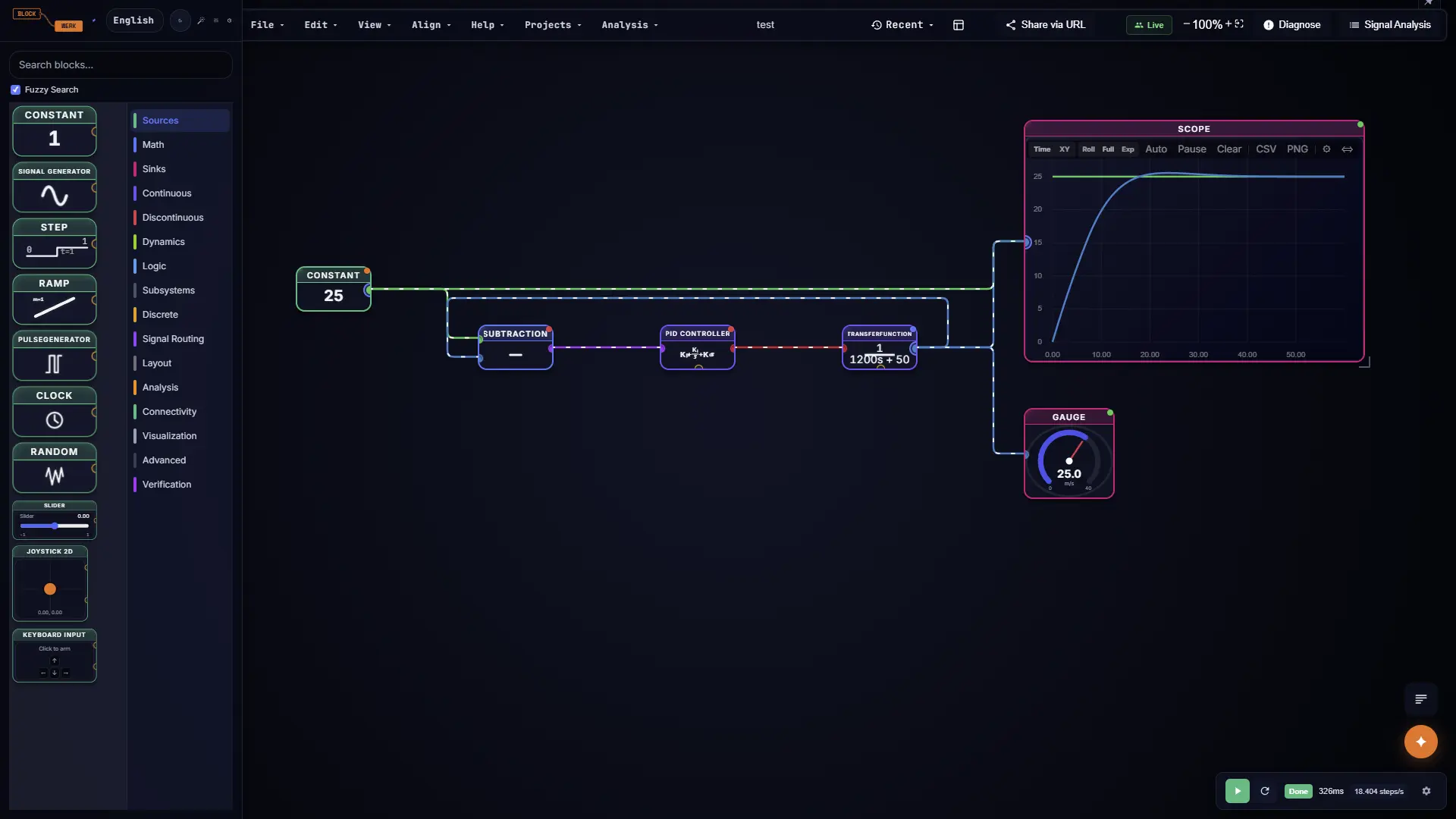
BlockWerk browser-based block diagram editor with live PID tuning and real-time waveforms

Zero setup. Zero Java dependencies. Real-time 60fps simulation with interactive PID controllers directly in your browser.

Why Engineers & Students Are Leaving Scilab / Xcos

Scilab and Xcos opened the door to free numerical computing, but their legacy Java Swing architecture and desktop installation hurdles frustrate engineers daily. Here is how BlockWerk reimagines dynamic system modeling.

Zero Java, Zero Install

No JRE version conflicts, no headless X11 issues, no 300+ MB installers. BlockWerk loads in under 1 second inside any modern browser on Windows, Mac, Linux, Chromebook, or iPad.

Real-Time Parameter Tuning

In Xcos, changing a gain requires halting the simulation. In BlockWerk, drag interactive sliders for PID controllers and gains while the engine runs at 60 fps to witness instant physical stability changes on GPU-accelerated scopes.

1-Click Client & Class Sharing

Stop emailing `.zcos` or `.sci` files to clients and professors who cannot open them. Send a single secure link: they click and interact with live sliders without installing anything.

Production Code Generation

Export your block diagrams directly into clean, self-contained C++, Python, or Rust code. Compile onto microcontrollers, Arduino, ESP32, or integrate into your production firmware.

Smartphone as Live Sensor

Scan a QR code on your monitor with your iPhone or Android phone to stream live gyroscope and accelerometer data over WebRTC directly into your simulation block diagram.

3 MB & Low-Bandwidth Friendly

Built for engineers and universities worldwide. The entire WebAssembly engine is under 3 MB, caches instantly via PWA, and executes 100% locally on your computer with zero ongoing data usage.

Side-by-Side Comparison

See how BlockWerk compares to traditional Scilab / Xcos desktop environments.

Capability Scilab / Xcos BlockWerk
Installation & Setup ✕ 300+ MB download, requires Java JRE setup ✓ Zero install — 3 MB WebAssembly loads in 1s
Cross-Platform Support ~ Platform binaries (frequent Linux/Mac issues) ✓ Any browser: Windows, macOS, Linux, Chromebook, iPad
Interface & Rendering ✕ Legacy Java Swing GUI with multi-window clutter ✓ Modern 60fps dark/light canvas with fluid zoom
Simulation Engine ~ C/Fortran solvers with Java bridge overhead ✓ Native Rust WASM: RK4, RK45 & TR-BDF2 (stiff)
Live Parameter Tuning ✕ Batch only: must re-run simulation for changes ✓ Live interactive sliders & continuous execution
Sharing & Collaboration ✕ Emailing proprietary `.zcos` files back and forth ✓ 1-click shareable URLs & real-time multiplayer
Hardware & IoT Integration ~ Complex external C modules / serial drivers ✓ WebRTC smartphone sensor, WebSerial, MQTT
Code Generation ~ Limited manual C translation tools ✓ Standalone C++, Python, and Rust code export
AI Copilot & Scripting ✕ None ✓ Model Context Protocol (MCP) & Agent API
Cost & Licensing ✓ Open-source (GPL / CeCILL) ✓ 100% Free client-side, zero license server

Tailored for Engineers Worldwide

Students & Educators

No waiting on university IT approvals or fighting campus VPN license pools. Get instant homework results, frequency response plots (Bode, Nyquist), and step responses for lab reports in clean white-background export format.

Freelancers & System Consultants

Cannot justify thousands of euros for proprietary desktop software for a quick contract? Build your model with Transfer Functions or State-Space blocks, generate production C++ code, and send your client a locked live demonstrator they can inspect on their phone.

R&D in Developing Markets

Engineers in India, Brazil, Southeast Asia, and Eastern Europe often rely on dated Scilab versions or risky cracked software. BlockWerk offers a 100% legal, high-performance simulation environment — explore our interactive Battery BMS SoC Masterclass or Inverted Pendulum control on standard laptops.

Frequently Asked Questions

Do I need Java installed to use BlockWerk?
No. Unlike Scilab and Xcos, BlockWerk is built completely on web standards: TypeScript, React, and a high-performance Rust simulation engine compiled to WebAssembly. Java is never required.
Is BlockWerk completely free to use?
Yes. BlockWerk runs 100% client-side in your own browser. Because simulations do not consume expensive backend server compute, you can build, simulate, and export diagrams without any license fees or subscription walls.
Can I run BlockWerk offline or in low-bandwidth areas?
Yes! The entire simulator bundle is under 3 MB. Once loaded, BlockWerk functions as a Progressive Web App (PWA) and can execute complex simulations completely offline with zero internet access.
What numerical solvers does BlockWerk support?
BlockWerk includes fixed-step RK4 (Runge-Kutta 4th order), adaptive-step RK45 (Dormand-Prince), and implicit TR-BDF2 for stiff dynamic systems and complex non-linear models. Learn more in our Simulation Solvers Guide and Continuous Integrator documentation.
Can I export code to run on microcontrollers?
Yes. BlockWerk provides direct code generation in C++, Python, and Rust, producing clean, standalone simulation steps suitable for embedded firmware, Raspberry Pi, ESP32, and Arduino hardware, or scriptable via the Agent API.

Ready for Modern Simulation?

Leave legacy desktop software behind. Start modeling and simulating your dynamic systems in seconds.

Launch BlockWerk Free ⚡ Try Interactive DC Motor PID