STEM Education & Lightweight Hardware

Control Systems Simulation on Chromebook & iPad

No high-end Windows laptop required. BlockWerk runs high-performance control theory, dynamic modeling, and physics simulations 100% in your browser — zero installation, zero IT approval, and completely free for students and schools.

Start Simulating Free ⚡ Open Interactive Classroom Lab
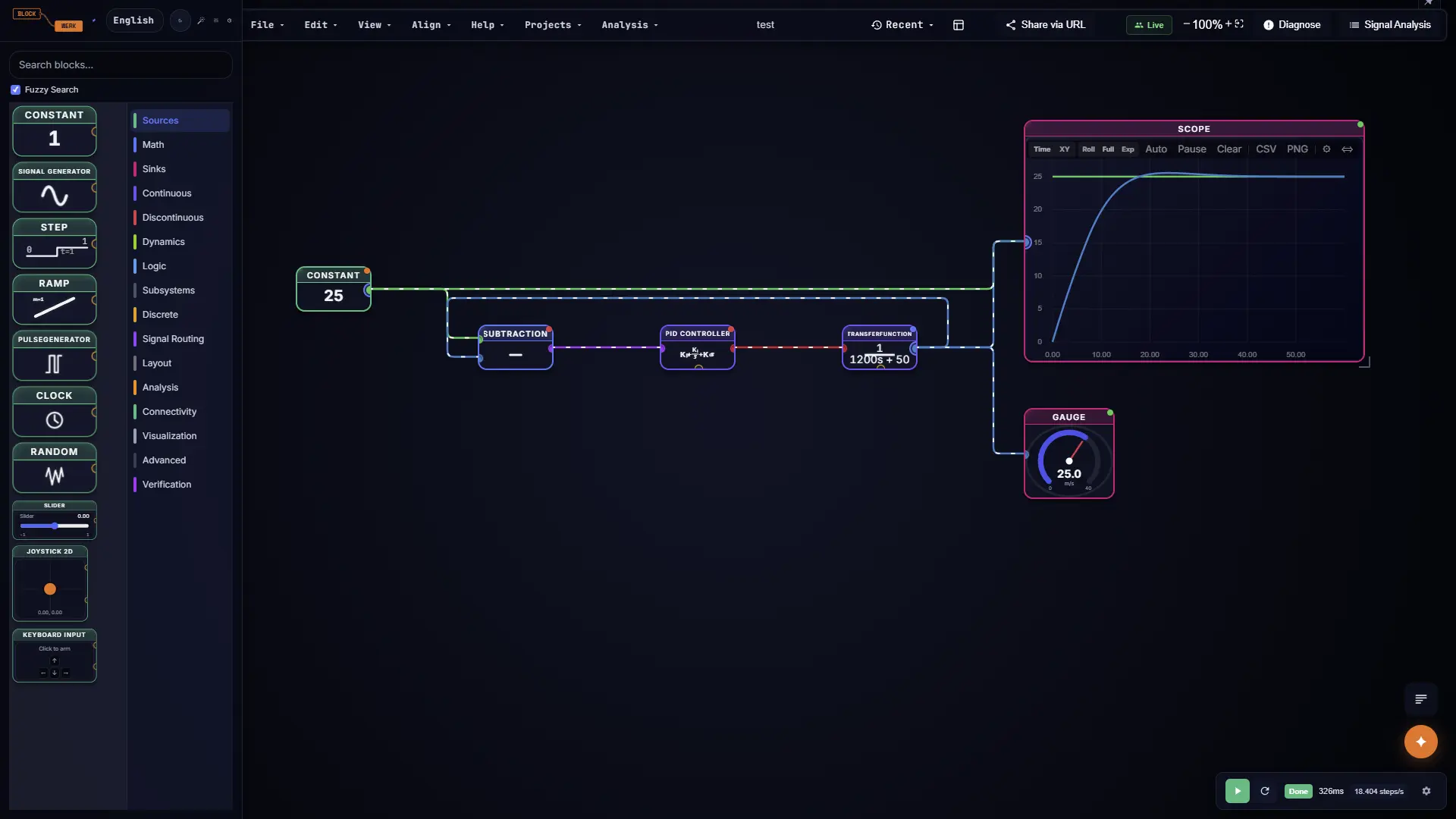
BlockWerk simulation running on lightweight Chromebook and iPad browser

Full dynamic systems modeling and PID feedback loops right inside ChromeOS, iPadOS, macOS, and Linux browsers.

Designed for Modern Engineering Education

Engineering students shouldn't need a $2,000 gaming laptop to study feedback loops and transfer functions. BlockWerk democratizes engineering education for every student and classroom.

Runs on Any $150 Chromebook

Powered by Rust compiled to WebAssembly, the entire simulation engine executes client-side on student devices with 60fps responsiveness, even on modest school-issued hardware.

Instant 1-Second Setup

No 6 GB downloads, no fighting with university VPNs, and no campus license server queue. Students click a link and start experimenting with circuits and feedback control in under a second.

Smartphone Physics Sensor

No expensive external hardware or DAQ boards needed for lab experiments. Students scan a QR code with their phone to stream real gyro and accelerometer data into their diagrams via WebRTC.

Intuitive Parameter Sliders

Students build physical intuition by adjusting $K_p$, $K_i$, $K_d$ in the PID Controller, damping ratio $\zeta$, or natural frequency $\omega_n$ in the Second-Order System live, observing overshoot and settling time in real-time oscilloscopes.

Publication & Lab Report Ready

Say goodbye to dark screenshots cropped from desktop tools. Export crisp, white-background PNG and SVG figures directly into Google Docs, Microsoft Word, or LaTeX thesis documents.

Classroom & Privacy Safe

Zero student accounts, zero tracking, and zero personal data stored. 100% compliant with student privacy policies (FERPA/COPPA). Works offline as a PWA during classroom exams.

Classroom Software Comparison

Why schools and STEM universities are adopting browser-native BlockWerk over legacy campus software.

Criterion Traditional Campus Software BlockWerk
Chromebook & iPad Support ✕ Unsupported or requires sluggish remote VDI ✓ 100% native support in Chrome, Safari & Edge
Installation & Disk Footprint ✕ 6+ GB installer with admin privileges needed ✓ 0 MB install — 3 MB WebAssembly engine with RK4, RK45 & TR-BDF2 solvers
Interactive Parameter Tuning ~ Re-run simulation each time a parameter changes ✓ Live interactive sliders & continuous 60fps waves
Lab Report Figure Export ✕ Dark plots requiring manual inverted screenshots ✓ 1-click white background export for Docs & LaTeX
Physical Hardware Sensors ✕ Expensive external USB DAQ boxes ($300+) ✓ Student smartphone gyro/accel via WebRTC QR code
Real-Time Lab Teamwork ✕ Huddling around one desktop monitor ✓ Real-time multiplayer collaborative canvas
Campus License Cost ✕ Thousands of euros per year per campus seat ✓ 100% Free for students, educators & schools
Student Privacy (FERPA/COPPA) ~ Mandatory student accounts and cloud tracking ✓ Client-side execution — zero accounts or tracking

Curriculum Coverage from Day One

Classical Control Theory

Explore Transfer Functions, open-loop vs. closed-loop step response, PID controller tuning, root locus analysis, Bode frequency response plots, and Nyquist stability margins.

Modern Control & State Space

State-space continuous and discrete matrices $(\mathbf{A}, \mathbf{B}, \mathbf{C}, \mathbf{D})$, full-state feedback LQR controllers (Inverted Pendulum Masterclass), Luenberger observers, and Kalman filters.

Signals, Sensors & DSP

Real-time FFT spectrum analysis, FIR and IIR digital filtering, noise injection, sensor quantization, lead-lag phase compensation, and live smartphone accelerometer streaming.

Educator & Student Questions

Can students use BlockWerk on school-managed Chromebooks?
Yes, absolutely. Because BlockWerk runs entirely inside the web browser via standard WebAssembly and WebGL, it requires no administrative install permissions, browser extensions, or Chrome Enterprise store approvals.
How do students submit their lab assignments?
Students can export deterministic, clean JSON project files, generate high-resolution white-background images for their written lab reports, or share a direct 1-click URL with their teaching assistants.
Does BlockWerk comply with school student privacy regulations?
Yes. BlockWerk executes simulations 100% locally on the student's device. No student accounts, email addresses, or personally identifiable information (PII) are collected, making it fully compliant with FERPA, COPPA, and GDPR requirements.
Can students use BlockWerk during exams without internet?
Yes. BlockWerk is a full Progressive Web App (PWA). Once loaded into the browser cache, it operates completely offline without an internet connection.
How does the smartphone sensor integration work?
In any diagram with a PhoneController or RemoteSensor block, students can scan an on-screen QR code with their mobile camera. This establishes an encrypted, low-latency WebRTC peer-to-peer data channel that streams accelerometer and gyroscope readings directly into the simulation in real time.

Empower Your Engineering Students

Bring interactive, zero-barrier control systems simulation to every classroom device.

Launch BlockWerk Free ⚡ Try DC Motor PID Experiment